
If you are unable to access zapAnalytics due to a forgotten password or failed login attempt, you can easily reset your password using the secure process provided by zapliance.
Reset your Password
- Try to log in to zapAnalytics as usual. If the login fails, you will see the option "Reset password" on the screen.
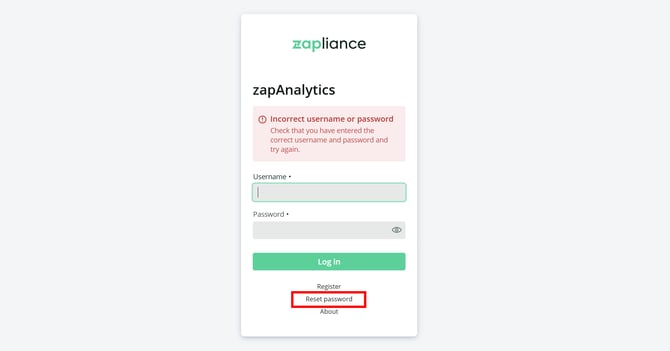
- Click on "Reset password". A new window will appear.
- In the window, enter your registered email address. You will also be asked to provide a keyphrase.
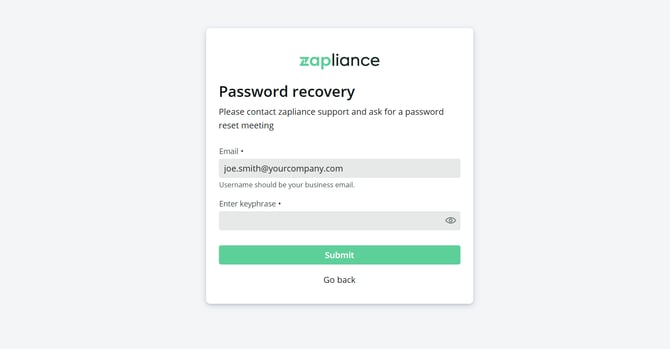
- Contact your Customer Success Manager at zapliance to obtain your personal keyphrase.
- Enter the keyphrase you received in the provided field. Then, choose a new password and confirm it.
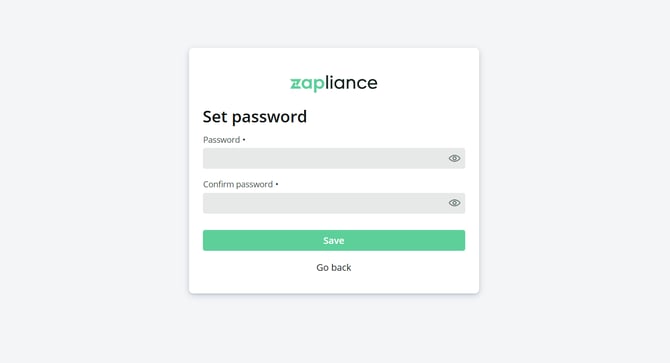
- After successfully entering the information, you can use your new password to log in to zapAnalytics.
Important: The keyphrase is provided by your Customer Success Manager for added security. Please keep this information safe and do not share it with unauthorized persons.