
General Information on Data Extraction
Remote Function Call (RFC) is a long-established SAP communication architecture and the standard mechanism used by zapAnalytics to communicate with SAP systems.
All extracted data is stored locally in a PostgreSQL database as a copy. Only SAP standard function modules and a SAP user with reading rights (system or dialog) are needed. Depending on the agreed solution, SAP tables can be read and narrowed down to specific objects.
To establish a targeted connection with the SAP system, SAP connection parameters are required. These parameters vary depending on whether the target system is a message or application server.
During data extraction, the connection to the SAP system must be maintained. In the event of a connection interruption or missing rights, data extraction must be started again.
Governance
SAP continues to document RFC-based extraction for SAP Signavio Process Intelligence, including RFC_READ_TABLE, selected tables and fields, partitioning and operational controls. zapliance applies this pattern in a customer-controlled environment with read-only access, deterministic execution, defined scope and monitoring.
Every SAP extraction is initiated by an authorized customer user, either manually or through a customer-configured schedule. zapAnalytics executes the approved scope through predefined, deterministic RFC logic.
For more information, see SAP Governance Data Extraction with zapliance.
SAP User with RFC Function Module
This guide provides a comprehensive overview of the necessary authorizations to enable Remote Function Call (RFC) access to your SAP system. The SAP user needs full BBP_RFC_READ_TABLE access rights for optimal functionality.
You can also use a system user (USTYP B in USR02) instead of a dialog user (USTYP A in USR02).
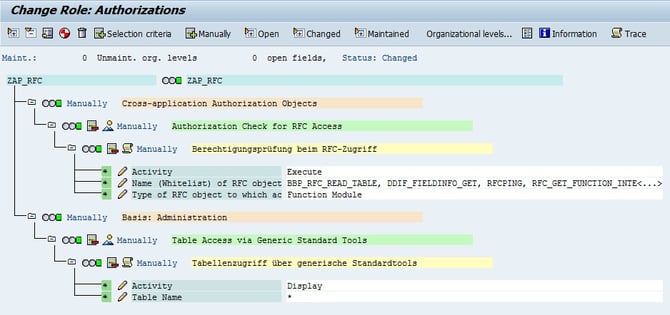
The following access rights should be at least available:
- S_RFC Authorization Object:
- Activity (ACTVT):
- Execute (16)
- Name of RFC-Objects (RFC_NAME):
- RFC_GET_FUNCTION_INTERFACE
- RFC_READ_TABLE
- DDIF_FIELDINFO_GET
- RFCPING
- STFC_CONNECTION
- BBP_RFC_READ_TABLE
- Optional for attachment download:
- SO_DOCUMENT_READ_API1 (for GOS)
- ALINK_RFC_TABLE_GET (for ArchiveLink)
- Activity (ACTVT):
-
-
- Type of RFC-Objects (RFC_TYPE):
-
-
-
- Function Module (FUNC)
-
- S_TABU_NAM Authorization Object:
- Activity (ACTVT):
- Display (03)
- Table Name (TABLE):
- See tables below
- See tables below
- Activity (ACTVT):
Limitation of SAP Tables
| DD17S, T000, T001, T001A, T009, T009B, T001K, DD07T, NRIV, T001L, T001W, T003, T003T, T005, T005T, T007S, T008, T008T, T011, T011T, T014, T023T, T030K, T030W, T041C, T041CT, T043, T052, T052U, T074T, T077S, T077Z, T093, T093C, T093T, T100, T134T, T156, T156T, T159L, T161, T161T, T163, T173, T173T, T685, T685T, T880, T881, TABW, TABWT, TBSL, TBSLT, TCURC, TCURT, TCURX, TCURF, TCURP, TCURR, TCURV, TPFID, TSTCT, TTYP, TVAK, TVAKT, TVFS, TVFST, TVLK, TVLKT, BKPF, REGUV, BSEG, BSET, FAGL_011FC, FAGL_011PC, FAGL_011QT, FAGL_011SC, FAGL_011TC, FAGL_011VC, FAGL_011ZC, REGUH, REGUP, SKA1, SKAT, SKB1, EKKO, EKPO, EBAN, EKBE, TVKO, VBAK, VBRK, LIKP, LIPS, VBAP, VBRP, USR02, USR40, UST04, ANEP, ANLA, ANLB, ANLBZA, ANLC, ANLH, ANLZ, ANKA, ANKT, MARA, MKPF, MSEG, MAKT, MBEW, TDG41, KNB1, LFB1, KNA1, KNBK, LFA1, LFBK, KNKK, CDPOS, CDHDR, TCDOB, TCDOBT, TIBAN, KNAS, SRGBTBREL, TOA01, TOA02, TOA03, DD02T, DD03L, DD04T, TKA02, LFAS, TOASP, BSEC, GLT0, T012K, T042I, FAGLFLEXA, FAGLFLEXT |
Note: Specific zapliance Content Bundles may require a subset of the listed tables. The necessary tables for each Content Bundle are available in the applicable Content Bundle Description. This full list enables the usage of all zapliance Content Bundles.
Connection Data to the SAP System
To connect to the SAP system, certain connection data is required. zapAnalytics offers the function to enter this connection data when creating the project and reuse it for future projects.
Depending on the configuration of the SAP target system, a distinction is made between message and application servers:
- Message Server (MSHOST)
- Message Server
- Message Server Port
- System ID
- Group/Server
- SAP Router String
- SAP Client
- SAP Application Server
- Application Server
- Instance Number
- System ID
- SAP Router String
- SAP Client
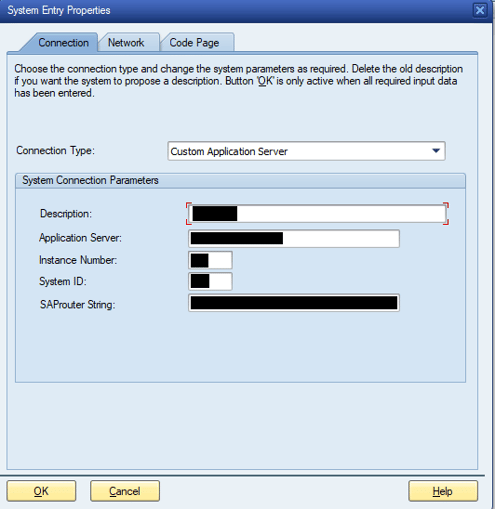
The individual data can also be taken directly from the SAP Logon Pad. The following screenshots show how this works.
Connection Parameters Message Server:
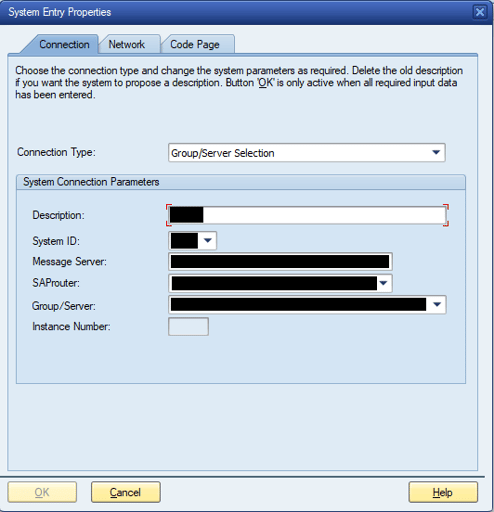
Connection Parameters Application Server:
Usage of SAP Web GUI in Power BI
zapAnalytics enables you to call up SAP documents directly from the Power BI result dashboards. To do this, the corresponding SAP Web GUI URL must be provided in zapAnalytics. Example: With the web URL https://mySAP.com:44300/sap/bc/gui/sap/its/webgui, “mySAP.com:443000” would be entered in zapAnalytics.
For more details, see this article.
Extended SAP Rights for End Users
In order to access the desired documents, the end user (e.g. auditor) requires specific SAP rights. These rights include access to the following SAP transaction codes:
- FB03: Display accounting documents
- ME53: Display purchase requisitions
- ME23: Display purchase orders
- VL03: Display deliveries
- VA03: Display sales orders
- VF03: Display billing document
Make sure that all relevant users have the necessary authorizations to carry out these transactions.
Impact on the SAP System
In over 2000 projects RFC has been reliable and there have been no performance impacts on any SAP production system (e.g. R3, ECC, or S4).