The zapAgent Wilma is designed to provide interactive analysis of your SAP data within your business context. Based on your prompts, Wilma autonomously selects and applies the most suitable tools from her toolkit, documents the outcomes, and delivers actionable insights directly in the chat.
To ensure she adapts perfectly to your unique data environment and interprets your prompts as intended, we offer a review process for any unexpected results. If a response doesn't match your desired outcome - whether it’s a misunderstanding of a prompt or a data discrepancy - we are here to help. Submitting these instances allows our team to analyze the interaction and ensure Wilma remains your most reliable audit partner.
Export Conversation
-
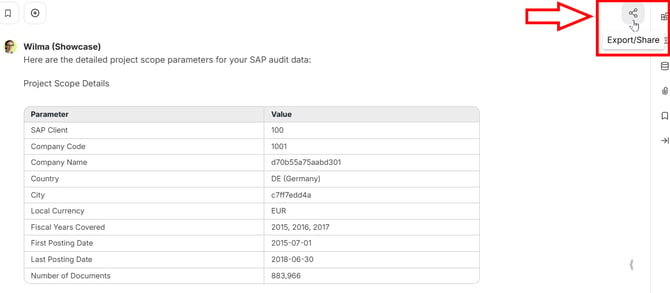
In the relevant chat, click on the "Export/Share" icon in the top right corner.
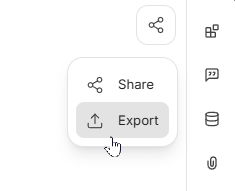
- Click on the second option in the drop-down menu, labeled "Export".
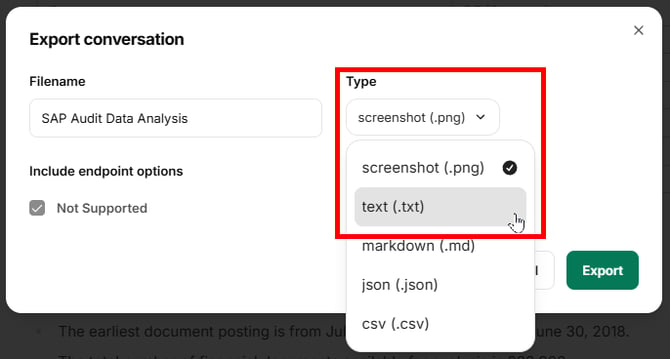
- A pop-up window opens. Navigate to the drop-down menu below "Type" and select "text (.txt)".
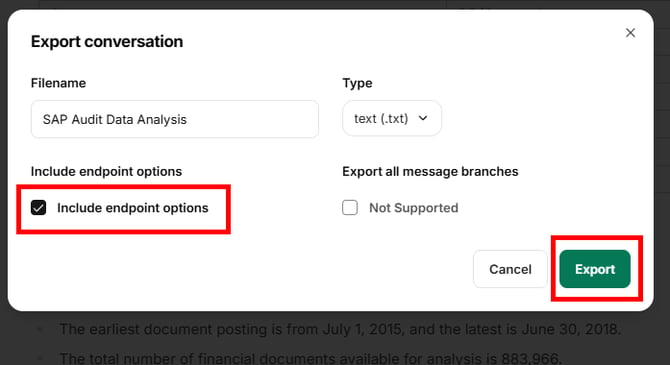
- Before exporting, make sure the checkmark "Include endpoint options" is ticked.
- Finally, click on "Export" to download the .txt file. It contains the chat log and technical details needed for support.