
zapAnalytics requires an SAP RFC user with specific access rights to download data from the SAP system. Sometimes, due to missing access rights, the data download process is hindered, impacting the performance and effectiveness of these software tools.
You can check all necessary RFC access rights in the following Knowledge Base article:
Setup Guide SAP
This article provides a comprehensive guide on how to identify and resolve access rights issues using SAP transaction code SU53.
Identifying Missing SAP Access Rights
The key to resolving this issue lies in identifying which specific access rights are missing. SAP transaction code SU53 helps in diagnosing and displaying the last failed authorization check, making it easier to understand what permissions are lacking.
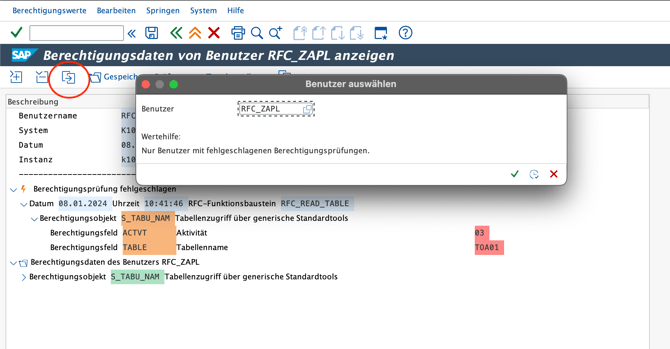
Step-by-Step Guide to Check Access Rights in SAP
1. Encounter the error:
-
- Initiate the data download process in zapAnalytics.
- If specific SAP access rights are missing, the process will fail, prompting an error with no sufficient rights for the SAP table.
2. Use the transaction SU53 in SAP
-
- Immediately after the error, log into the SAP system with the SAP user ID used for the data download.
- Enter the transaction code SU53 in the command field.
3. Analyzing the SU53 Output:
-
- The SU53 screen will display the most recent failed authorization check for your user ID.
- It shows detailed information about the missing access rights, such as the authorization object and the required activity.
4. Documenting the findings:
-
- Take a screenshot or note down the details of the missing access rights as shown in the SU53 output.
5. Requesting access rights:
-
- Contact your SAP security administrator or the relevant department with the information about the missing access rights.
- Provide them with the details from SU53 to facilitate a quick resolution.
6. Verifying the solution:
-
- Once the access rights have been granted, retry the data download process in zapAnalytics.
- If there are no further errors, the issue has been successfully resolved.
Identifying and resolving missing SAP access rights is a critical step in ensuring the seamless operation of zapAnalytics. By effectively utilizing SAP transaction code SU53, users can quickly diagnose and communicate their access needs to the SAP security team, thus minimizing downtime and enhancing productivity.