
1. General Information zapHome OnPrem
zapHome OnPrem is a secure, self-contained platform for operating specialized analysis agents that process SAP data directly within an organization’s own IT environment. The objective is to automatically extract, prepare, and analyze SAP data based on individually selected indicators for risks and opportunities. The solution is deployed via Docker and only requires a connection to the SAP system. All data remains within the organization’s infrastructure at all times, ensuring full control and maximum security.
Analysis results can be flexibly processed further, for example, with Power BI Desktop or in combination with other zapliance tools. This provides a powerful, data privacy-compliant, and customizable solution for SAP data analysis—without any external access to sensitive information.
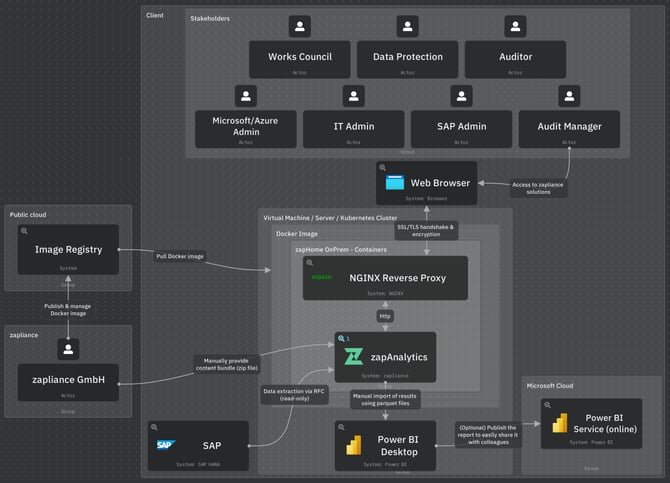
You need to set up the following components to get zapHome alive:
2. Virtual Machine/Server
A Linux-based virtual machine (VM) or server that meets the specified requirements is prepared as the host environment for Docker.
Details can be found in the Knowledge Base article: Setup Guide Virtual Machine / Server
We recommend Docker as the container management tool. For other deployment scenarios, please refer to this article.
3. Docker Setup for zapHome OnPrem
zapHome OnPrem is deployed using Docker on the dedicated VM or server. zapliance publishes and manages its images through image registries, ensuring access to the latest verified versions.
Details can be found in the Knowledge Base article: Setup Guide Docker
4. Docker Containers
Docker containers provide the ability to run applications together with all required components in isolated environments, ensuring consistent and independent operation across systems.
4.1 NGINX Reverse Proxy Server
To enable secure browser-based access, all communication between the user's web browser and the containers is routed through a reverse proxy server. It acts as a single gateway, allowing for centrally managed SSL/TLS encryption. Thus, only one certificate is needed to secure the entire environment, simplifying the setup.
4.2 zapAnalytics
The zapAnalytics software is provided as a Docker container.
Details can be found in the Knowledge Base article: Setup Guide zapAnalytics
4.2.1 RFC User Access
zapAnalytics accesses the SAP system for data extraction via RFC using read-only permissions.
Details can be found in the Knowledge Base article: Setup Guide SAP
4.2.2 Content Bundles
A content bundle wraps all analysis logic into a .zip file. After the relevant company codes, fiscal years, and client information are provided, zapliance generates and shares the content bundle (.zip) via an exchange folder in OneDrive. You must upload the content bundle .zip file in zapAnalytics to create a project.
Details can be found in the Knowledge Base article: Content Bundles
4.2.3 Parquet Files
After data processing is completed, result files specific to each solution are made available for download. The generated parquet files serve as the foundation for creating Power BI dashboards.
Details can be found in the Knowledge Base article: Setup Guide Power BI Reports
5. Power BI Desktop (on End-User Device)
Once data extraction and processing are completed within zapAnalytics, the Power BI report templates (.pbit) need to be opened using Power BI Desktop for importing the results from the zapAnalytics result files (.parquet). This will create Power BI reports (.pbix) that are accessible locally by the customer, serving as the basis for the workshop session.
Details can be found in the Knowledge Base article: Setup Guide Power BI Reports
Additional information
Details on data protection, information security and access management can be found in this section.
Note on former setups
Existing customers using the former setup (valid until May 2026) can refer to this article. If you are uncertain about the setup currently used in your organization, please reach out to your zapliance Customer Success Manager.