
1. General Information zapHome OnPrem Basic
zapHome OnPrem Basic is a secure, self-contained platform for operating specialized analysis agents that process SAP data directly within an organization’s own IT environment. The objective is to extract, prepare, and analyze SAP data based on individually selected indicators for risks and opportunities. The solution runs as standalone application on a virtual machine/server and only requires a connection to the SAP system. All data remains within the organization’s infrastructure at all times, ensuring full control and maximum security.
Analysis results can be flexibly processed further, for example with Power BI Desktop. This provides a powerful, data privacy-compliant solution for SAP data analysis—while keeping infrastructure, data, and access permissions under customer control.
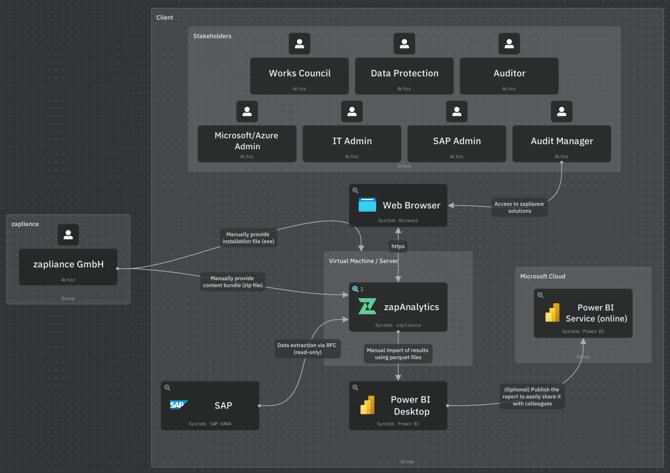
2. Two-Layer Architecture
zapHome OnPrem Basic is composed of two technically separate layers:
- Data extraction (Layer 1)
- Data processing (Layer 2)
Layer 1 uses SAP RFC connectivity to extract approved SAP data and create governed data copies within the zapAnalytics project database.
The data scope is defined and approved by the customer. zapAgents cannot independently change the data scope or initiate additional calls. Thus, all data extractions are defined, approved, and controlled by the customer.
Layer 2 operates exclusively on these extracted data copies. It does not access SAP, does not use RFC, and does not process live SAP data.
As a result, SAP access and data processing (including result generation) are technically separated. Analysis is performed on copied data only after extraction has been completed, not on the SAP system itself.
For more information, see SAP Governance Data Extraction with zapliance.
3. Components
You need to set up the following components to get zapHome alive:
3.1 Virtual Machine/Server
A virtual machine (VM) or server that meets the specified requirements is prepared as the host environment.
Details can be found in the Knowledge Base article: Setup Guide Virtual Machine / Server
3.2 zapAnalytics
The zapAnalytics software is installed using an .exe file.
Details can be found in this Knowledge Base article: Setup Guide zapAnalytics
a) RFC User Access
zapAnalytics accesses the SAP system for data extraction via RFC using read-only permissions, based on the customer-approved data scope. Every data extraction is initiated by an authorized customer user, either manually or through a customer-configured schedule. zapAnalytics executes the approved extraction scope through predefined, deterministic RFC logic.
Data extraction via RFC is a separate layer technically independent from subsequent data processing, during with RFC is not utilized or required. No zapAgent can autonomously initiate or control data extractions.
Details can be found in the Knowledge Base article: Setup Guide SAP
b) SAP Web GUI
Details can be found in the Knowledge Base article: Setup SAP Web GUI
c) Content Bundles
A content bundle wraps all analysis logic into a .zip file. After the customer provides the relevant company codes, fiscal years, and client information, zapliance generates and shares the content bundle (.zip) via an exchange folder in OneDrive. You must upload the content bundle .zip file in zapAnalytics to create a project.
Details can be found in the Knowledge Base section: Content Bundles
d) Parquet Files
After data processing is completed, result files specific to each solution are made available for download. The generated parquet files serve as the foundation for creating Power BI dashboards.
Details can be found in the Knowledge Base article: Setup Guide Power BI Reports
4. Power BI Desktop (on End-User Device)
Once data extraction and processing are completed within zapAnalytics, the Power BI report templates (.pbit) need to be opened using Power BI Desktop for importing the results from the zapAnalytics result files (.parquet). This will create Power BI reports (.pbix) that are accessible locally by the customer, serving as the basis for the workshop session.
Details can be found in the Knowledge Base article: Setup Guide Power BI Reports
Additional information
Details on data protection, information security and access management can be found in this section.